
Best Crypto Wallets: Security, Features, and Expert Recommendations
Why a Secure Wallet is Essential for Crypto Investors
I see it all the time: someone buys their first bit of Bitcoin and just leaves it sitting on the exchange. Honestly, that is a disaster waiting to happen. In 2024 alone, hackers made off with over $1.9 billion, and that number isn’t shrinking. If you don’t hold your private keys, you don’t really own your crypto. It is that simple. A wallet isn’t a place that stores physical coins; it is a tool that manages the digital codes giving you access to your funds on the blockchain.
By February 2026, the stakes have only gone up. We have seen a 53% jump in active stablecoin wallets over the past year. This tells me that people are moving away from pure speculation and are using crypto for actual savings. When you are storing money meant for a car or a house, a basic password is not enough anymore. You need layers: two-factor authentication, heavy encryption, and preferably a hardware device that stays offline.
I think security is always a trade-off with convenience. Sure, typing in codes every time is a bit of a pain. But I promise you, it feels a lot better than waking up to a zero balance because you were too lazy to set up a proper backup. A modern wallet is more than just storage now—it is a “super-app” for swapping and staking. But without a solid recovery plan, all those fancy features are completely useless.
Types of Crypto Wallets and Their Use Cases
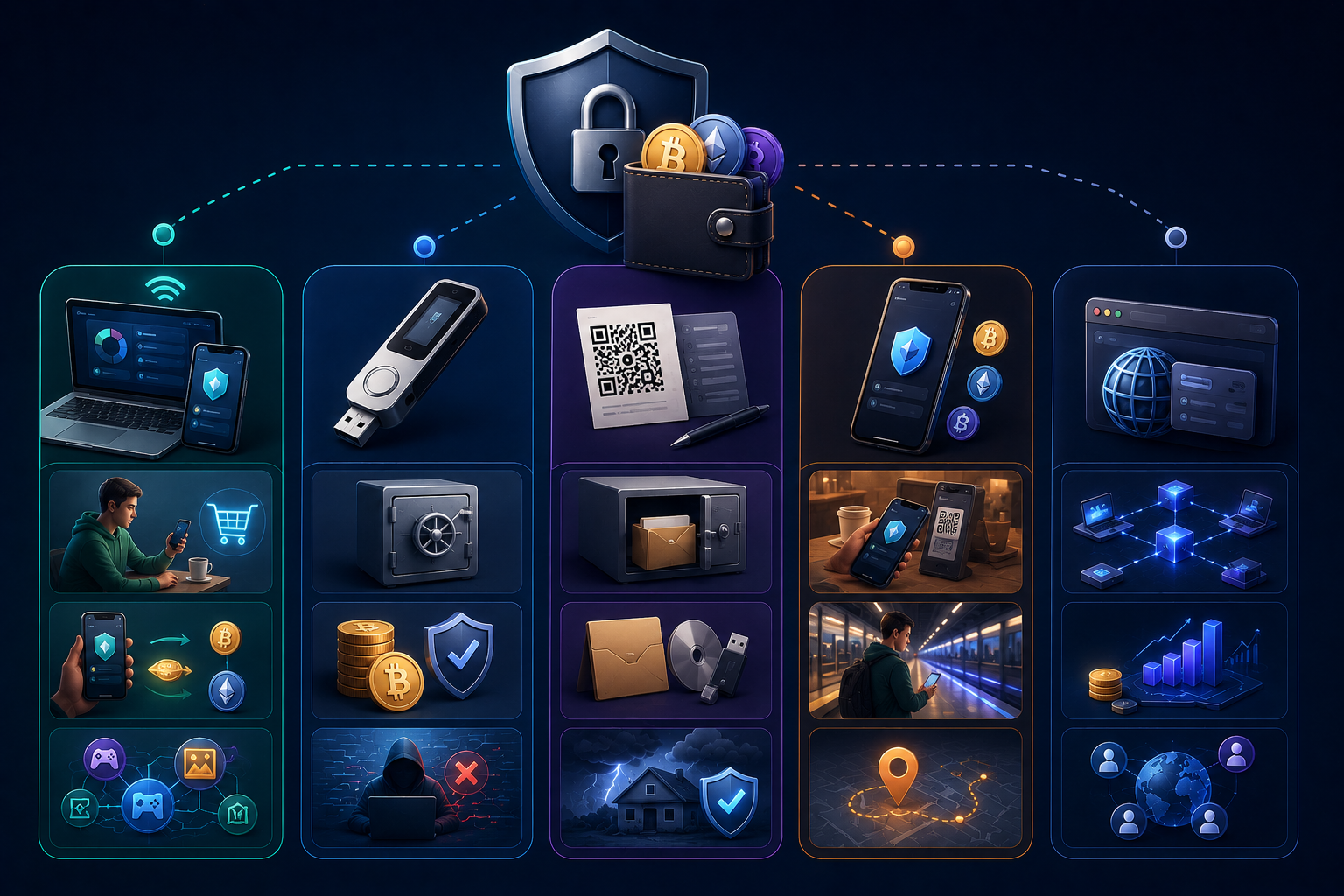
Picking a wallet is all about how you plan to use your coins. I like to split them into two main groups: hot and cold. Hot wallets stay connected to the internet. This is great for people who trade on exchanges or use crypto for daily payments. Cold wallets, on the other hand, live entirely offline. They are the best choice if you want to store large amounts for years. Think of it as the difference between the leather wallet in your pocket and a high-security bank vault.
Types of Crypto Wallets: Which One is Right for You?
Hardware Wallets: The Ultimate in Security
For me, hardware devices like Ledger or Trezor are the gold standard. These are small gadgets that keep your keys isolated from the internet. The best part is that a hacker cannot touch your funds even if they have full control over your computer. To send money, you have to physically press a button on the device itself. Sure, they cost money—anywhere from $49 to $500—but peace of mind is worth it. Just remember: if you lose both the device and your recovery sheet, your coins are gone forever.
Software Wallets: Ease of Use and Accessibility
Programs like Exodus or Electrum live right on your desktop. They are free, look great, and give you total control over your keys. This is a solid choice for active traders who need to swap tokens quickly. But there is a catch: your PC is always online. If you have a habit of downloading sketchy files or clicking weird links, your money is at risk. I suggest using these only for the funds you plan to move within a week.
Mobile Wallets: On-the-Go Access to Your Crypto
Trust Wallet is probably the most famous example here. It is an app on your smartphone, perfect for those who want 24/7 access to their assets anywhere. It is convenient, fast, and very beginner-friendly. The biggest risk is someone stealing or hacking your actual phone. This is why you must use biometrics and a strong passcode for the app; otherwise, you are just asking for trouble.
Web Wallets: Quick and Convenient for Everyday Use
I am talking about browser extensions like MetaMask. Today, you cannot really dive into DeFi or buy NFTs without one. They are incredibly useful because they plug directly into websites. But honestly, these are the most vulnerable wallets out there. I never keep more in MetaMask than I am willing to lose to a phishing attack. It is a tool for the web, not a place for your life savings.
Paper Wallets: A More Secure, Offline Option
This is “old-school” crypto. You print your keys as a QR code on a physical piece of paper. Hackers are powerless against a sheet of paper in your drawer. However, by 2026, this is more of a hobbyist thing. Paper can burn, rot, or just get lost during a move. Unless you plan to keep that paper in a fireproof safe, you are better off looking at modern hardware solutions.
Top Features to Look for in a Crypto Wallet
Picking a wallet is not about finding the coolest icon in the app store. To me, it is about finding a balance between your own caution and total common sense. There are features you simply cannot skip if you want to keep your sanity. Let’s look at what actually matters in early 2026.
Security Features: Keeping Your Assets Safe
Security is not just one thing; it is a series of layers. The first layer is two-factor authentication (2FA). If a wallet does not have it, I will not touch it. Then there is encryption, which turns your data into a mess for anyone without your password. If you are really serious, look for EAL6+ or EAL7 certified chips, like the ones in the NGRAVE ZERO. This means the hardware is protected against physical hacking at a military grade. Most importantly, your private keys must stay with you and never touch the cloud.
User-Friendly Interface and Accessibility
If you open an app and feel like a pilot trying to land a plane in a storm, delete it. A good wallet has to be simple. By 2026, large touchscreens have become the standard, like on the Ledger Nano Flex or NGRAVE. They make it easy to actually read the wallet address before you hit send. If the screen is tiny, you will eventually make a typo and send your money into a black hole.
Support for Multiple Cryptocurrencies
Having a different wallet for every single coin is a recipe for unnecessary chaos. I prefer multi-asset solutions. Exodus supports assets across 50+ networks, and Ledger handles over 5,500 tokens. It is just easier to see your whole portfolio in one place. Just make sure the wallet supports the specific networks you need, like Solana or Polygon, and not just Bitcoin.
Backup and Recovery Options
People lose phones and break laptops. That is just life. The main thing is that your Bitcoin does not disappear along with the hardware. A traditional seed phrase of 12 or 24 words is the old way, but it is easy to lose or throw away by mistake. Today, we see better options: steel plates for engraving keys or MPC systems like Zengo that do not use a single secret phrase at all. Whatever you pick, you need a plan for what happens if your device gets crushed by a truck tomorrow.
Integration with Exchanges and DeFi Platforms
Just holding coins is boring and often a waste of potential profit. A modern wallet needs to do more. I like being able to swap tokens right inside the app or connect to DeFi protocols for staking. This saves time and cuts down on transfer fees. If a wallet lets you earn interest on your stablecoins without making you feel like a coding genius, that is a huge win.
Best crypto wallets for 2026
Choosing the best wallet is a bit like picking a car: some people need a safe family SUV, while others want a quick bike for the city. By early 2026, the market is crowded, but I have picked a few leaders that are actually worth your cash. We looked at dozens of factors, from security audits to how easy it is to tap the buttons on the screen.
Best overall: Exodus
I think Exodus is a great pick for anyone who wants to keep things simple. It works on every platform—from Windows to iOS—and supports assets across 50+ blockchain networks. The biggest plus is the design and the built-in swap feature; you don’t have to be a genius to trade one coin for another inside the app. It has a high CER AAA security rating, though I don’t love that they lack public third-party audits.
Best for beginners: Zengo
Zengo is a lifesaver if you are terrified of losing that scrap of paper with 24 words on it. This wallet does not use seed phrases at all. Instead, it uses MPC (multi-party computation) technology, which splits the key between your device and their server. Setup takes just a couple of minutes, and their support is online 24/7. Honestly, it is the friendliest interface I have seen, even if the in-app exchange fees are a bit steep.
Best for bitcoin purists: Sparrow
If Bitcoin is the only thing you care about, Sparrow is your tool. It is a desktop-only wallet that gives you total control over every single transaction. It supports the Lightning Network for fast payments and lets you plug in almost any hardware device. But be warned: if you don’t understand the basics of how the blockchain works, Sparrow might feel too complex, as there are no simple “buy in one click” buttons here.
Most secure in the world: NGRAVE ZERO
For those holding serious amounts of money, I recommend the NGRAVE ZERO. This is the tank of the crypto world. Boasting EAL7 certification, this device offers the highest security level for any financial product globally. By ditching Bluetooth, Wi-Fi, and USB ports, it communicates with the outside world strictly through QR codes. You also get a stainless steel backup called GRAPHENE, built to survive even a house fire. While the price tag is high, there is simply nothing better for those seeking military-grade protection.
Best mobile wallet: Trust Wallet
If you live on your smartphone, go with Trust Wallet. It is arguably the most powerful mobile tool out there, supporting a massive number of coins and chains. It is very easy to view your NFTs on Ethereum or Polygon right in the app. The interface is clean and fast, and the built-in browser lets you connect to any decentralized app. Just don’t forget to turn on biometrics in the settings.
Best high-end hardware wallet: Ledger Nano Flex
The Ledger Nano Flex is a step up in terms of hardware convenience. It features a large E-Ink display that is easy to read in the sun and saves battery life. It uses an EAL6+ secure chip and can connect to your phone via NFC. I appreciate it for supporting over 5,500 tokens, though needing the Ledger Live app for everything can be a bit of a chore sometimes.
How to Choose the Right Crypto Wallet for Your Needs
Choosing a wallet is not about following trends; it is about your specific lifestyle and goals. I always tell people to start by asking themselves: are you a “HODLer” who buys and forgets, or an active trader who moves funds daily?. If you are sitting on a lot of cash or long-term savings, hardware devices like Ledger or Trezor are the only way to go. For small amounts or quick payments, a free mobile app like Trust Wallet is usually enough.
The variety of coins you own also matters. If you only care about Bitcoin, you don’t need a bloated wallet that supports thousands of tokens; something specialized like Sparrow is a better fit. But if you are chasing new projects on Solana or Polygon, make sure your wallet actually supports those networks. Cost is another factor—while software apps are free, hardware security will cost you anywhere from $49 to $500. Personally, I think that is a small price for insurance, especially since hackers stole over $1.9 billion in 2024 alone.
Finally, think about the extras. Do you want to earn passive income? Look for wallets that offer staking directly in the app. If you value privacy, look into options like Best Wallet, which doesn’t ask for your personal info to get started. My best advice is to take it slow. Download the app, send a tiny amount of crypto first, and see if the interface feels right to you before moving your entire life savings there.
How to Set Up Your Crypto Wallet
Setting up a wallet for the first time can be a bit nerve-wracking. I remember my hands shaking a little while writing down those 24 words. It feels like a huge responsibility, but the process is actually quite simple once you get started. Most wallets today follow a very similar, logical flow. Just make sure you are alone and nobody is looking over your shoulder.
Setting up a hardware wallet
When you unbox a new Ledger or Trezor, check the security seals first. If it looks tampered with, send it back immediately. Plug the device into your computer or phone and follow the on-screen prompts. You will need to create a PIN code. Do not use something obvious like “0000” or your birthday. The most critical part is the recovery phrase. The device will show you a series of words—write them down on physical paper or engrave them on steel. Never take a photo of this phrase and never store it in your phone’s cloud. Finally, download the official app, like Ledger Live or Trezor Suite, to manage your assets.
Setting up a software wallet
Software wallets are even faster to get running. Just download the app to your phone or desktop. When you open it, choose “Create a new wallet.” You’ll need to set a strong password to lock the app on your device. But remember, this password isn’t your master key; it only protects the app on that specific phone. The app will generate a 12 or 24-word recovery phrase. Do not skip this step and do not store it digitally. I once almost lost access because I thought I’d write it down later. Don’t be that guy. Once the phrase is safely tucked away, your wallet is ready for your first deposit.
Common mistakes to avoid when using crypto wallets
I have heard too many stories about people losing everything because of silly mistakes. The most frequent and probably the most painful one is ignoring backup and recovery. Many users assume their smartphone or laptop will work forever. But hardware fails. If you did not write down your recovery phrase on paper and you lose access to your device, your money is gone for good. Do not even think about keeping a photo of it in the cloud or in your notes. A single hack of your email is all it takes for someone to reach your assets.
Weak passwords are another open door for thieves. Using your birth date or simple words is a bad idea. With over $1.9 billion stolen through hacks and scams in 2024, you cannot afford to be careless. I always say: turn on two-factor authentication (2FA) wherever possible. This is your second line of defense. Even if a bad actor finds your password, they cannot withdraw funds without 2FA. This is a simple step that actually saves accounts.
Finally, do not forget about updates. Ignoring wallet update notifications means leaving security holes wide open. Developers constantly patch vulnerabilities, and an old app version is an easy target. Most importantly: never share your private keys with anyone. These are your real “passwords” to your money on the blockchain. If someone claiming to be from support asks for them, they are a scammer, plain and simple.
Published Articles
Crypto On-Ramps and Off-Ramps Explained: How Fiat and Crypto Move In and Out
Entering the world of digital assets often feels like trying to cross...
 Popular
Bitcoin Pizza Guy: The Story Behind the First Real Bitcoin Purchase
Introduction The history of Bitcoin is full of dramatic ups and downs,...

Crypto Basics Explained: A Beginner’s Guide to Cryptocurrency and Trading
Introduction The world of finance is changing right before our eyes. Just...
 Popular
Uniswap Explained: What It Is, How It Works, and How to Use the UNI DEX
Introduction Decentralization and decentralized platforms that have emerged in recent years have...
 Popular
Bitcoin Lightning Network Explained: What It Is and How Bitcoin Lightning Works
Introduction In the world of cryptocurrency, transaction speed and costs have always...
How Bitcoin ATMs Work: A Complete Guide to Using Crypto ATMs
Introduction Millions of people around the world use cryptocurrencies today – at...